Virtual environment
Virtual Environment @ UPV
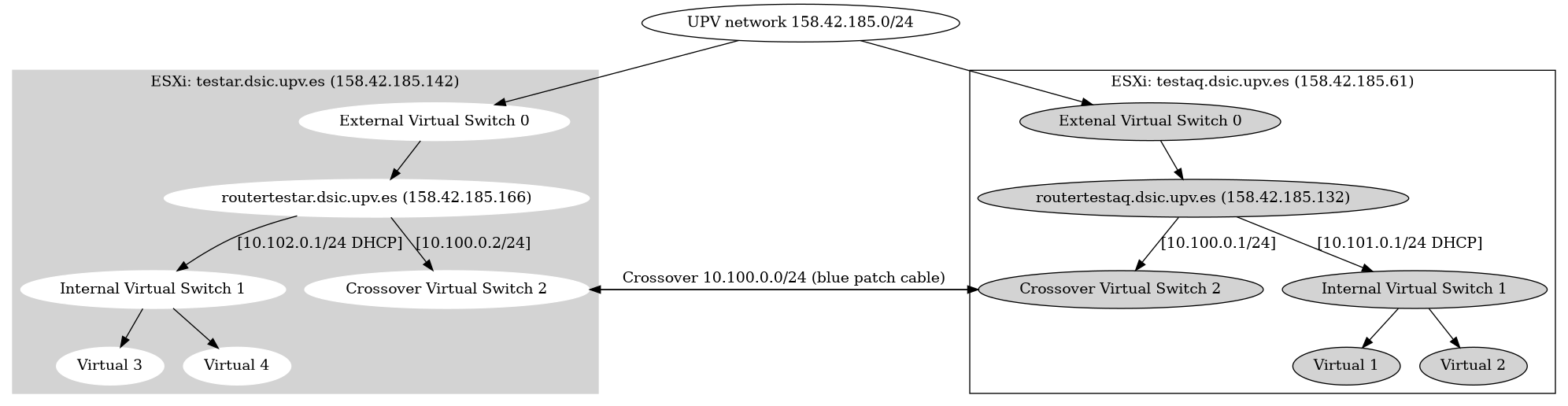
OpenVPN Client configuration
On the routertestar.dsic.upv.es and routertestaq.dsic.upv.es an OpenVPN server is installed. Users can connect to one of the routers via OpenVPN. A user certificate needs to be created and added to an OpenVPN client configuration. To create a OpenVPN client configuration please follow the following steps:
- Log into
routertestar.dsic.upv.es - Become
rootuser - Read the OpenVPN CA password in
/root/testar-ca-key-password.txt - Run the following command:
openvpn-users.sh - Follow the instructions of the script and give the CA password when asked. 2 OpenVPN configuration files will be created and the certificates will be distibuted to the 2 testar routers
- Copy the generated OpenVPN configurations files from the /root/ directory to your own computer with scp/winscp
- Distribute the OpenVPN configuration files to the end user, so they can import this in their OpenVPN client.
Virtual machines
| 10.101.0.1 | routertestaq |
|---|---|
| 10.101.0.2 | Windows10 Guy 01 |