Virtual environment: Difference between revisions
Jump to navigation
Jump to search
m Carlo Sengers |
m added dns names |
||
| Line 68: | Line 68: | ||
!10.101.0.1 | !10.101.0.1 | ||
!routertestaq | !routertestaq | ||
!DNS | |||
!CPU | !CPU | ||
!Mem | !Mem | ||
| Line 74: | Line 75: | ||
!10.102.0.1 | !10.102.0.1 | ||
!routertestar | !routertestar | ||
!DNS | |||
!CPU | !CPU | ||
!Mem | !Mem | ||
| Line 79: | Line 81: | ||
|- | |- | ||
|10.101.0.2 | |10.101.0.2 | ||
|Windows10 | |Windows10 Guy01 | ||
|guy10.esx.testar.org | |||
|2 | |2 | ||
|8GB | |8GB | ||
| Line 85: | Line 88: | ||
| | | | ||
|10.102.0.2 | |10.102.0.2 | ||
| | |Windows10 Ad Mulders 01 | ||
|admulders01.esx.testar.org | |||
|2 | |2 | ||
|8GB | |8GB | ||
| Line 92: | Line 96: | ||
|10.101.0.3 | |10.101.0.3 | ||
|Windows10 Carlo Sengers 01 | |Windows10 Carlo Sengers 01 | ||
|carlosengers01.esx.testar.org | |||
|2 | |2 | ||
|8GB | |8GB | ||
| Line 98: | Line 103: | ||
|10.102.0.3 | |10.102.0.3 | ||
|Windows 10 Ad Mulders 02 | |Windows 10 Ad Mulders 02 | ||
|admulder02.esx.testar.org | |||
|2 | |2 | ||
|8GB | |8GB | ||
| Line 104: | Line 110: | ||
|10.101.0.4 | |10.101.0.4 | ||
|Windows10 Carlo Sengers 02 | |Windows10 Carlo Sengers 02 | ||
|carlosengers02.esx.testar.org | |||
|2 | |2 | ||
| | |8GB | ||
|128GB | |128GB | ||
| | | | ||
|10.102.0.4 | |10.102.0.4 | ||
| | |||
| | | | ||
| | | | ||
| Line 115: | Line 123: | ||
|- | |- | ||
|.. | |.. | ||
| | |||
| | | | ||
| | | | ||
| Line 121: | Line 130: | ||
| | | | ||
|.. | |.. | ||
| | |||
| | | | ||
| | | | ||
| Line 127: | Line 137: | ||
|- | |- | ||
|10.101.0.99 | |10.101.0.99 | ||
| | |||
| | | | ||
| | | | ||
| Line 133: | Line 144: | ||
| | | | ||
|10.102.0.99 | |10.102.0.99 | ||
| | |||
| | | | ||
| | | | ||
Revision as of 14:37, 25 November 2019
Virtual Environment @ UPV
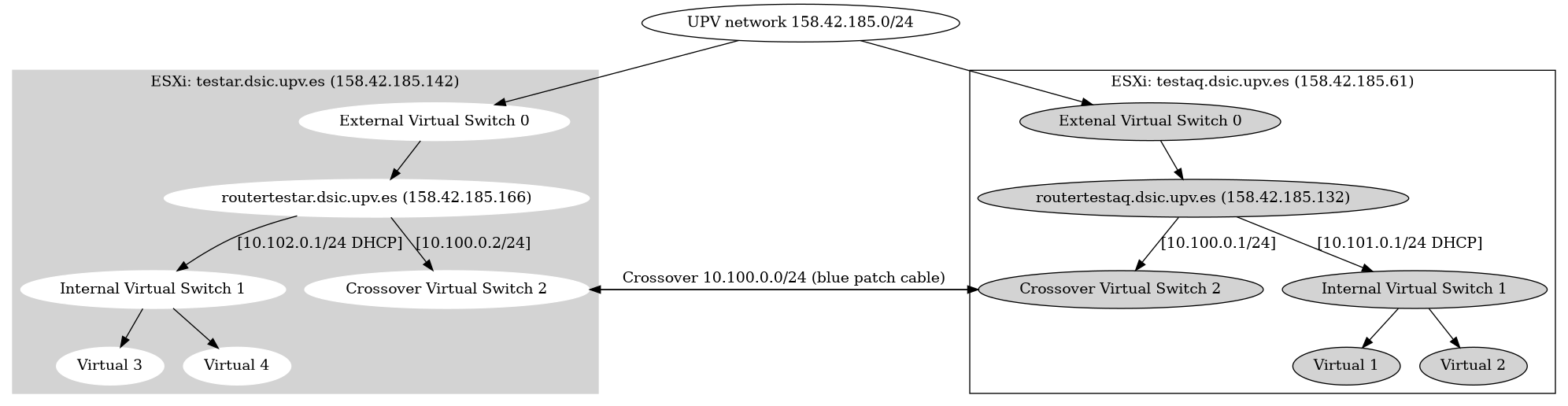
OpenVPN Client configuration
On the routertestar.dsic.upv.es and routertestaq.dsic.upv.es an OpenVPN server is installed. Users can connect to one of the routers via OpenVPN. A user certificate needs to be created and added to an OpenVPN client configuration. To create a OpenVPN client configuration please follow the following steps:
- Log into
routertestar.dsic.upv.es - Become
rootuser - Read the OpenVPN CA password in
/root/testar-ca-key-password.txt - Run the following command:
openvpn-users.sh - Follow the instructions of the script and give the CA password when asked. 2 OpenVPN configuration files will be created and the certificates will be distibuted to the 2 testar routers
- Copy the generated OpenVPN configurations files from the /root/ directory to your own computer with scp/winscp
- Distribute the OpenVPN configuration files to the end user, so they can import this in their OpenVPN client.
Virtual machines
| 10.101.0.1 | routertestaq | DNS | CPU | Mem | HDD | ........................ | 10.102.0.1 | routertestar | DNS | CPU | Mem | HDD |
|---|---|---|---|---|---|---|---|---|---|---|---|---|
| 10.101.0.2 | Windows10 Guy01 | guy10.esx.testar.org | 2 | 8GB | 128GB | 10.102.0.2 | Windows10 Ad Mulders 01 | admulders01.esx.testar.org | 2 | 8GB | 128GB | |
| 10.101.0.3 | Windows10 Carlo Sengers 01 | carlosengers01.esx.testar.org | 2 | 8GB | 128GB | 10.102.0.3 | Windows 10 Ad Mulders 02 | admulder02.esx.testar.org | 2 | 8GB | 128GB | |
| 10.101.0.4 | Windows10 Carlo Sengers 02 | carlosengers02.esx.testar.org | 2 | 8GB | 128GB | 10.102.0.4 | ||||||
| .. | .. | |||||||||||
| 10.101.0.99 | 10.102.0.99 |