Virtual environment: Difference between revisions
Jump to navigation
Jump to search
m removed graphviz |
Tag: Rollback |
||
| Line 1: | Line 1: | ||
==Virtual Environment @ UPV== | ==Virtual Environment @ UPV== | ||
<graphviz> | |||
digraph G { | |||
subgraph cluster_0 { | |||
style=filled; | |||
color=lightgrey; | |||
node [style=filled,color=white]; | |||
switch2_0 -> routertestar | |||
routertestar -> switch2_1 [ label = "[10.102.0.1/24 DHCP]" ] | |||
switch2_1 -> t2_1 | |||
switch2_1 -> t2_2 | |||
routertestar -> switch2_2 [ label = "[10.100.0.2/24]" ] | |||
label = "ESXi: testar.dsic.upv.es (158.42.185.142)"; } | |||
subgraph cluster_1 { | |||
node [style=filled]; | |||
switch1_0 -> routertestaq | |||
routertestaq -> switch1_2 [ label = "[10.100.0.1/24]" ] | |||
routertestaq -> switch1_1 [ label = "[10.101.0.1/24 DHCP]" ] | |||
switch1_1 -> t1_1 | |||
switch1_1 -> t1_2 | |||
label = "ESXi: testaq.dsic.upv.es (158.42.185.61)"; | |||
color=black | |||
} | |||
UPV -> switch2_0 [ label = "" ] ; | |||
UPV -> switch1_0 ; | |||
switch2_2 -> switch1_2 [ label = " Crossover 10.100.0.0/24 (blue patch cable) " ]; | |||
switch1_2 -> switch2_2; | |||
routertestar [ label = "routertestar.dsic.upv.es (158.42.185.166)" ] | |||
routertestaq [ label = "routertestaq.dsic.upv.es (158.42.185.132)" ] | |||
UPV [shape=ellipse label = "UPV network 158.42.185.0/24"]; | |||
switch1_0 [ label = "Extenal Virtual Switch 0" ] | |||
switch2_0 [ label = "External Virtual Switch 0" ] | |||
switch1_1 [ label = "Internal Virtual Switch 1" ] | |||
switch2_1 [ label = "Internal Virtual Switch 1" ] | |||
switch1_2 [ label = "Crossover Virtual Switch 2" ] | |||
switch2_2 [ label = "Crossover Virtual Switch 2" ] | |||
t1_1 [ label = "Virtual 1" ] | |||
t1_2 [ label = "Virtual 2" ] | |||
t2_1 [ label = "Virtual 3" ] | |||
t2_2 [ label = "Virtual 4" ] | |||
} | |||
</graphviz> | |||
===OpenVPN Client configuration=== | ===OpenVPN Client configuration=== | ||
Revision as of 22:04, 6 June 2020
Virtual Environment @ UPV
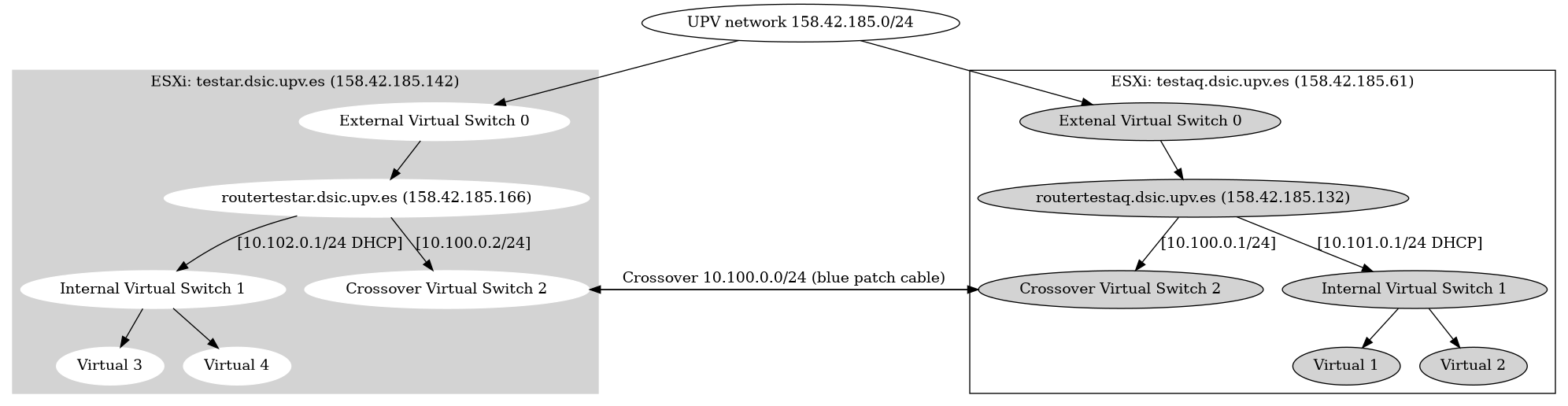
OpenVPN Client configuration
On the routertestar.dsic.upv.es and routertestaq.dsic.upv.es an OpenVPN server is installed. Users can connect to one of the routers via OpenVPN. A user certificate needs to be created and added to an OpenVPN client configuration. To create a OpenVPN client configuration please follow the following steps:
- Log into
routertestar.dsic.upv.es - Become
rootuser - Read the OpenVPN CA password in
/root/testar-ca-key-password.txt - Run the following command:
openvpn-users.sh - Follow the instructions of the script and give the CA password when asked. 2 OpenVPN configuration files will be created and the certificates will be distibuted to the 2 testar routers
- Copy the generated OpenVPN configurations files from the /root/ directory to your own computer with scp/winscp
- Distribute the OpenVPN configuration files to the end user, so they can import this in their OpenVPN client.
Virtual machines
| 10.101.0.1 | routertestaq | DNS | CPU | Mem | HDD | ........................ | 10.102.0.1 | routertestar | DNS | CPU | Mem | HDD |
|---|---|---|---|---|---|---|---|---|---|---|---|---|
| 10.101.0.2 | Windows10 Guy01 | guy10.esx.testar.org | 2 | 8GB | 128GB | 10.102.0.2 | Windows10 Ad Mulders 01 | admulders01.esx.testar.org | 2 | 8GB | 128GB | |
| 10.101.0.3 | Windows10 Carlo Sengers 01 | carlosengers01.esx.testar.org | 2 | 8GB | 128GB | 10.102.0.3 | Windows 10 Ad Mulders 02 | admulder02.esx.testar.org | 2 | 8GB | 128GB | |
| 10.101.0.4 | Windows10 Carlo Sengers 02 | carlosengers02.esx.testar.org | 2 | 8GB | 128GB | 10.102.0.4 | windows 10 master | windows10-master.esx.testar.org | 2 | 8GB | 128GB | |
| 10.101.0.5 | Windows 10 Ad Mulders 05 | admulders05.esx.testar.org | 2 | 8GB | 128GB | 10.102.0.5 | buhos | buhos.esx.testar.org | 4 | 8GB | 128GB | |
| 10.101.0.6 | Windows 10 Ad Mulders 06 | admulders06.esx.testar.org | 2 | 8GB | 128GB | 10.102.0.6 | Windows 10 Ad Mulders 03 | admulders03.esx.testar.org | 2 | 8GB | 128GB | |
| 10.101.0.7 | Windows 10 Ad Mulders 07 | admulders07.esx.testar.org | 2 | 8GB | 128GB | 10.102.0.7 | Windows 10 Ad Mulders 04 | admulders04.esx.testar.org | 2 | 8GB | 128GB | |
| 10.101.0.8 | Windows 10 Ad Mulders 08 | admulders08.esx.testar.org | 2 | 8GB | 128GB | .. | ||||||
| .. | ||||||||||||
| 10.101.0.11 | testar-demo1011 | 10.102.0.11 | testar-demo2011 | |||||||||
| .. | .. | |||||||||||
| 10.101.0.20 | testar-demo2020 |
10.102.0.25 | testar-demo2025
|
|||||||||
| 10.101.0.247 | Windows10
Fernando |